

Best Anti-Detect Browser for 2026: BitBrowser Review, Pricing & Setup Guide
As managing multiple online accounts becomes more complex, tools that ensure privacy and separation are no longer optional—they’re essential. BitBrowser is one of the leading anti-detect browsers designed to help professionals safely operate multiple identities without overlap.
In this guide, we’ll explore how BitBrowser works, its key features, pricing plans, and how to set it up step by step.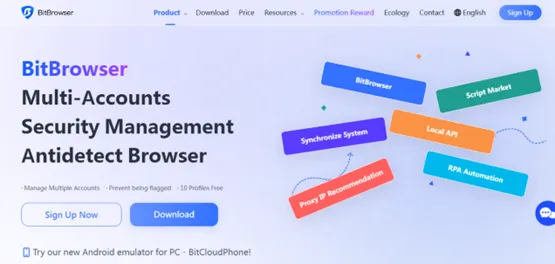
What Is BitBrowser and How Does It Work?
BitBrowser is an anti-detect browser that lets you create multiple independent browsing profiles. Each profile is fully isolated and behaves like a completely different device.
That means every profile has its own:
- Browser engine (Chromium or Firefox)
- Operating system settings
- IP address (via proxy)
- Device fingerprint (fonts, WebGL, timezone, etc.)
This separation prevents platforms from linking accounts together.
One of its most powerful additions is Cloud Phone, a virtual Android system that lets you run mobile apps in a simulated smartphone environment.
Who Is BitBrowser Best For?
BitBrowser is commonly used by:
- E-commerce sellers managing multiple stores
- Social media managers handling several accounts
- Affiliate marketers running campaigns at scale
- QA testers needing controlled environments
- Agencies managing multiple client accounts
Core Features Explained
1. Isolated Browser Profiles
Each profile runs in its own sandbox, ensuring zero data leakage between accounts.
2. Proxy Integration
Supports HTTP, SOCKS5, and SSH proxies. You can assign a unique IP to every profile.
3. Cloud Phone (Mobile Simulation)
Run Android apps, simulate SIM cards, and access Google Play — perfect for mobile-based tasks.
4. Bulk Management Tools
Create and manage hundreds of profiles using CSV import/export and batch operations.
5. Automation Capabilities
Use the Local API or built-in RPA tools to automate repetitive actions like logins or data entry.
6. Team Collaboration
Add team members, control permissions, and manage resource usage efficiently.
7. Advanced Fingerprint Customization
Fine-tune device fingerprints to closely mimic real user behavior.
Pricing Breakdown
BitBrowser offers flexible pricing depending on your needs:
- Free Plan – 10 profiles with basic functionality
- Starter Plan ($15/month) – Up to 100 profiles + batch tools
- Professional Plan ($69/month) – 300 profiles + API & team features
- Enterprise Plan – Custom pricing for large-scale usage
- Cloud Phone – Starts at ~$0.03 per day
Tip: Pricing may change, so always check the official website.
Advantages and Limitations
Advantages
- Free plan available with no expiration
- Built-in mobile environment (Cloud Phone)
- Strong fingerprint control for better anonymity
- Automation tools save time at scale
Limitations
- Performance can slow down with many active profiles
- Requires good proxies for best results
- Must be used responsibly to avoid violating platform rules
Why Choose BitBrowser Over Regular Browsers?
Traditional browsers share system-level data, making it easy for platforms to detect linked accounts.
BitBrowser solves this by giving each profile a unique digital identity, including:
- Separate fingerprints
- Different IP addresses
- Independent environments
This makes it a reliable solution for managing multiple accounts safely.
How to Set Up BitBrowser (Beginner Guide)
Step 1: Download and Register![]()
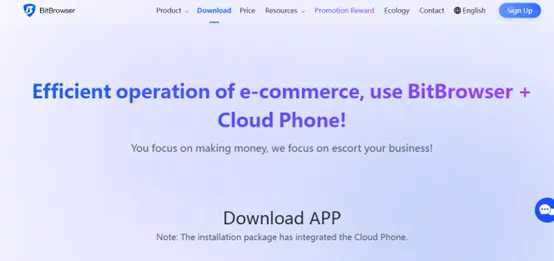
- Install BitBrowser from the official site
- Create an account and verify your email
- Start with the free plan
Step 2: Create a Profile![]()
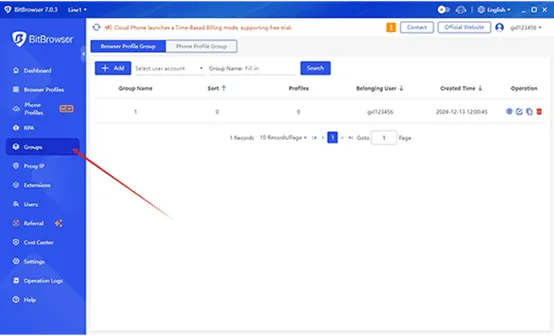
- Click “New Profile”
- Choose browser type (Chromium/Firefox)
- Configure system settings
- Launch the profile
Step 3: Add a Proxy![]()
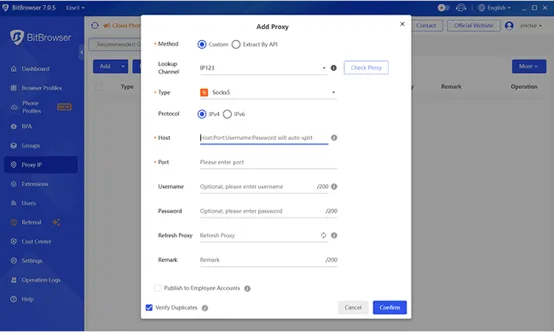
- Go to network settings
- Enter proxy details
- Test connection
Best practice: Use residential or mobile proxies for higher trust.
Step 4: Adjust Fingerprints
- Use the auto-generator or customize manually
- Verify uniqueness using fingerprint testing tools
Step 5: Use Cloud Phone
- Create a Cloud Phone instance
- Configure device settings
- Install apps and run mobile workflows
Scaling Your Workflow
As your needs grow, BitBrowser makes scaling easy:
- Bulk-create profiles using templates
- Save sessions with cookie export/import
- Assign tasks to team members
- Control Cloud Phone usage and costs
Automation Example
For managing multiple Instagram accounts:
- Create separate profiles
- Assign unique proxies
- Log into one account per profile
- Use Cloud Phone if mobile verification is needed
- Space actions naturally to avoid detection
Proxy Selection Guide
- Residential/Mobile Proxies → Best for social media and ads
- Datacenter Proxies → Faster but less trusted
- Rotating Proxies → Ideal for large-scale automation
Safety and Best Practices
To use BitBrowser effectively and safely:
- Follow platform rules
- Avoid spam or misleading behavior
- Test setups before scaling
- Back up your data regularly
Final Thoughts
BitBrowser is a powerful tool for anyone managing multiple online identities. With features like profile isolation, Cloud Phone, and automation tools, it offers everything needed for secure and scalable operations.
If used correctly and ethically, it’s one of the most reliable anti-detect browsers available in 2026.
Похожие публикации
Партнёрские программы
Смотреть все
1WIN ПАРТНЕРКА

Обзор RollerAds: умная пуш-сеть с инновационными инструментами

BroPush - партнёрская программа для монетизации и заработке на сайтах

Партнерская программа Семяныча - Лучшая партнерка по CPA и CPC моделям
Магазин
Смотреть все
Продается готовый скрипт онлайн-казино / игрового
Продается готовый скрипт онлайн-казино / игрового сайта Кому подходит: Тем,...

Бот для продажи VPN 3X-UI для Telegram
Telegram-бот для продажи VPN! Автоматизированный бот для продажи вашего...
Мониторинг хайп проектов на движке DLE
В данном скрипте есть возможность включить функцию чтобы пользователи сами...

Скрипт казино с 5 классическими играми.
Разработчики онлайн-казино, хотим поделиться отличной новостью: в январе мы...


Customer WishList / Избранные товары покупателей
Данный модуль позволяет просматривать избранные товары пользователей. Есть...